Verdicts here are built from published testing, real owner reports and spec sheets, not our own hands-on use. See how we judge →
Verdict: Buy. The FlexiSpot AlcoveRiser M7 is the standing desk converter most home offices should get, provided you buy the right width and understand that it is a manual gas-spring riser, not a motorised one. It does the one job a converter has to do, which is get a monitor and keyboard to standing height without you rebuilding your desk, and it does it with a lift mechanism that has held up across years of owner reports. This verdict is built from FlexiSpot’s own published specifications and Android Authority’s hands-on review of the 28 inch M7B.
The naming trap: M7 is not EM7
Before anything else, because this is where buyers lose money. FlexiSpot sells two visually similar converter lines. The M7 is manual: you squeeze handles on either side and a gas spring assists the lift. The EM7 is motorised: you press a button. FlexiSpot’s own M7 product page confirms the M7 line is not motorised.
Model codes make this worse rather than better. You will see M7B, M7MB, EM7MB and similar strings across retailers, where the trailing letters usually indicate colour and size rather than mechanism. The reliable tell is the E at the front. If a roundup quotes you a high price for an M7, check whether the product it actually describes has a motor, because that is an EM7 and a different purchase.
What it actually does well
- Gas-spring lift across the full range: FlexiSpot lists 4.7 to 20.1 inches of adjustment. Android Authority measured 4.7 to 19.7 inches on the 28 inch unit, roughly 15 inches of usable travel.
- Genuinely fast setup: Android Authority’s reviewer reported it took longer to open the box than to assemble the unit, with only the keyboard tray needing attaching and no tools required.
- Real weight capacity: FlexiSpot’s M7 spec listing gives 37.4 lb; Android Authority cites 33 lb on the 28 inch model. Either number is comfortable for a single monitor and a keyboard.
- Removable keyboard tray: you can run it as a plain riser if you would rather keep your keyboard on the desk surface.
- Five-year frame and desktop warranty, with three years on the gas spring, per FlexiSpot’s published warranty terms. The gas spring is the part that wears, so the shorter figure is the one that matters.
Where it falls short
The keyboard tray is the recurring complaint. Android Authority’s reviewer found it cramped when running a full-size keyboard and a mouse together, which is a real constraint if you have not measured your setup. On the 28 inch model the tray is the limiting factor long before the desktop is.
There is also no levelling adjustment. On an uneven desk that means a small amount of wobble with nothing you can do about it short of shimming the base yourself. And the M7 is deliberately plain: no cup holder, no cable management, no monitor arm mount. If you want cable routing you are adding it separately.
The last one is not a fault so much as physics. A converter sits on top of your existing desk, so it raises your screen but it cannot lower your desk. If your desk is already too high for seated typing, a converter locks that problem in place. That is the case where you buy a proper height-adjustable desk instead.
Which width should you buy?
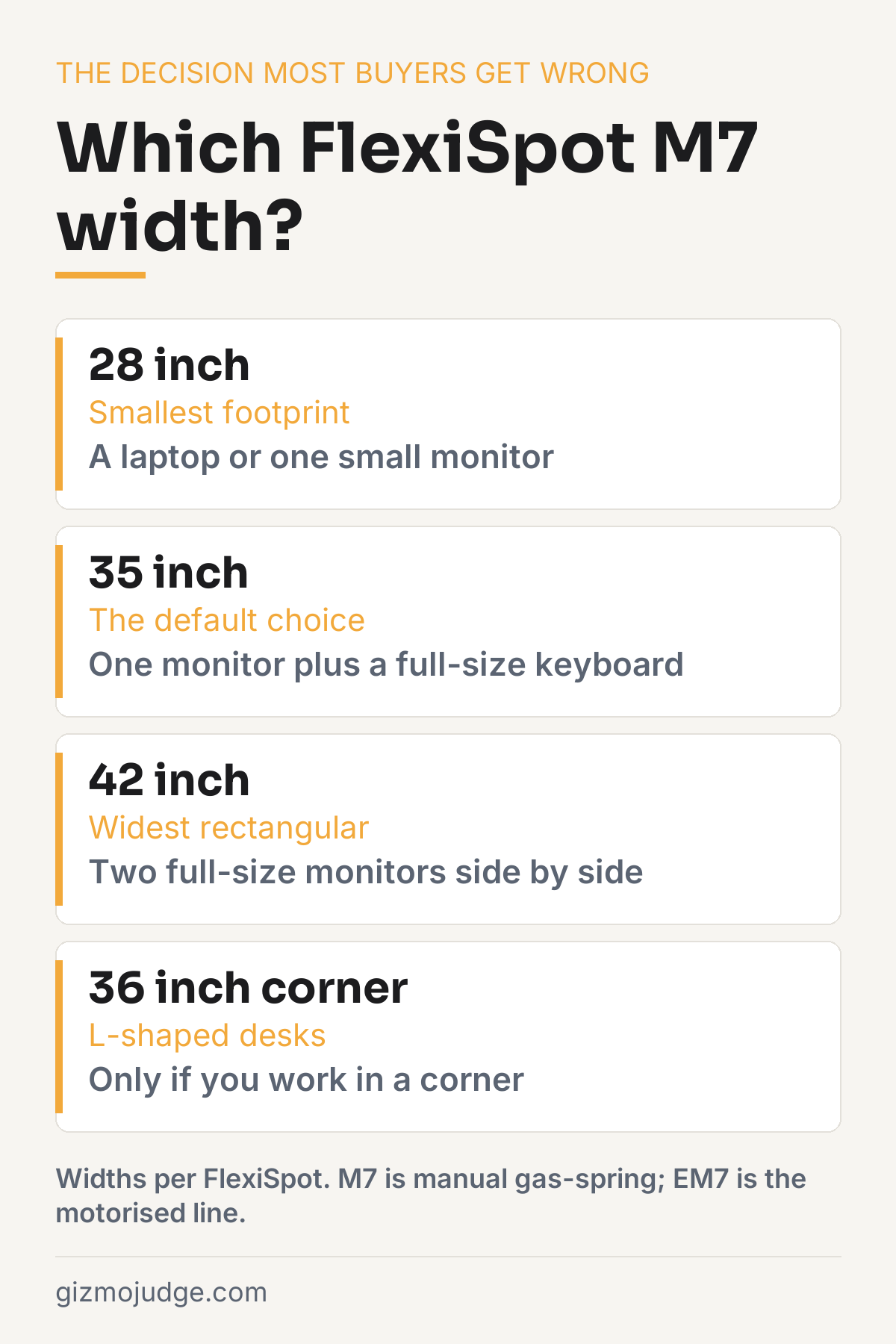
This is the actual decision, and it is the one most buyers get wrong. FlexiSpot lists the M7 in 28 inch, 35 inch and 42 inch widths, plus a 36 inch corner version.
- 28 inch: a laptop, or a single small monitor with a compact keyboard. Choose this only if desk width genuinely forces it, since the keyboard tray complaint bites hardest here.
- 35 inch: the default for most home offices. One monitor plus a full-size keyboard and mouse, without fighting for space.
- 42 inch: two full-size monitors side by side. If your current setup already feels cramped with two screens, width is almost always the real problem rather than the lift.
- 36 inch corner: only if you work in an L-shaped corner desk, where a rectangular converter wastes the corner entirely.
Buying one size down to save money is the most common regret with converters, because the surface is the thing you use every day and the lift is the thing you use twice.
Who should buy it, and who should not
Buy it if you have a desk you like, or a desk you cannot replace because you rent or share the space, and you want to stand for part of the day without a rebuild. That is the exact job the M7 does well.
Skip it if you want push-button height changes, in which case you are shopping the EM7 line or a full electric desk. Skip it too if your desk is already too tall when seated, because a converter cannot fix that. And skip the 28 inch specifically if you use a full-size keyboard and a mouse, because you will be annoyed by the tray within a week.
Frequently asked questions
Is the FlexiSpot M7 manual or electric?
Manual. The M7 AlcoveRiser uses a gas-spring lift you raise by hand with side handles, confirmed on FlexiSpot’s own M7 product page. The electric version is a different product line called the EM7. If a listing shows a motor and a control panel, you are looking at an EM7, not an M7, and the price gap between them is large.
What size FlexiSpot M7 should you buy?
FlexiSpot lists the M7 in 28 inch, 35 inch and 42 inch widths plus a 36 inch corner version. A single monitor with a full keyboard is comfortable at 35 inches. The 28 inch is laptop-plus-mouse territory, and 42 inches is what you want for two full-size monitors side by side.
How much weight does the FlexiSpot M7 hold?
FlexiSpot’s spec listing for the M7 series gives a 37.4 lb capacity. Android Authority’s hands-on review of the 28 inch M7B cites 33 lb for the desktop and 4.4 lb for the keyboard tray. Either figure comfortably covers one monitor and a keyboard, but a heavy dual-monitor load needs checking against the specific listing you are buying.
How high does the FlexiSpot M7 lift?
FlexiSpot’s M7 page lists an adjustment range of 4.7 to 20.1 inches above your existing desk. Android Authority measured the 28 inch M7B at 4.7 to 19.7 inches, so expect roughly 15 inches of usable travel. Whether that is enough depends on your existing desk height and your standing elbow height, not on the converter.
What is the main weakness of the FlexiSpot M7?
The keyboard tray. Android Authority’s reviewer found it cramped with a full-size keyboard and mouse together, and noted there is no levelling adjustment, so an uneven desk can produce wobble. Neither is a deal-breaker, but both are worth knowing before you buy the narrowest size.
Check the specs yourself
Every measurement quoted above comes from the product pages below. Prices and availability change, so check the source before you buy. Links verified 13 September 2026.
- FlexiSpot AlcoveRiser M7 Manufacturer
Specifications sourced from FlexiSpot’s published AlcoveRiser M7 product page and Android Authority’s hands-on review of the 28 inch M7B. Prices change often and are deliberately not quoted here. Check the current listing before buying. Affiliate disclosure.