Verdicts here are built from published testing, real owner reports and spec sheets, not our own hands-on use. See how we judge →
Verdict: Buy. The Lift is the vertical mouse named the best pick for most people in our ergonomic keyboards and mice roundup, and the spec sheet plus the review record explain why. A gentle 57° handshake angle, a compact shape built for small-to-medium hands, and a $70 price that undercuts Logitech’s own step-up model by roughly half. This verdict is built from PCWorld’s Editors’ Choice review, TechRadar and CNN Underscored’s coverage, and Logitech’s published specifications, not from an in-house test bench.
What it actually does well
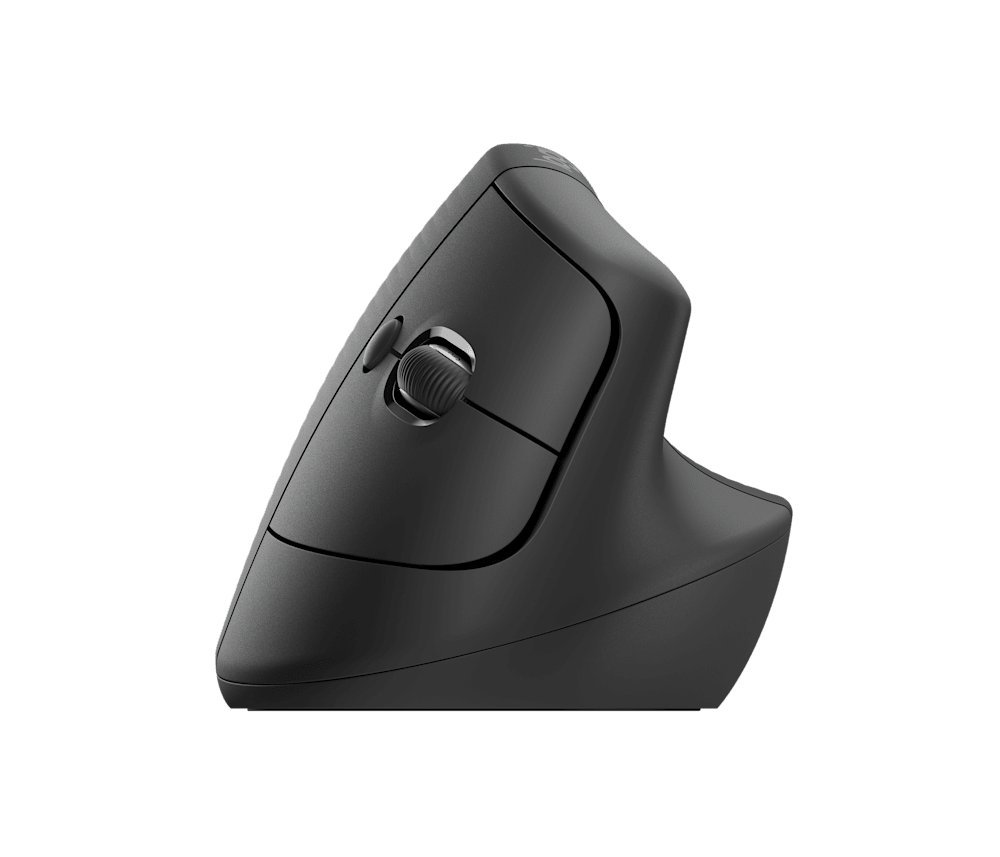
- 57° handshake angle: steep enough to relieve the forearm rotation a flat mouse forces, gentle enough that PCWorld measured a shorter adjustment period than steeper vertical mice like Logitech’s own MX Vertical.
- Built for smaller hands: at 4.25 x 2.76 x 2.8 inches and 0.28 lb, it is sized for small-to-medium hands specifically, with a left-handed version sold separately, a rarity in this category.
- Six programmable buttons customizable through Logitech’s Options+ software, plus a 400 to 4,000 DPI optical sensor with smooth tracking that PCWorld’s review confirmed shows no stuttering.
- Long battery life: runs on a single AA battery rated for up to 24 months, according to Logitech’s published specs, no charging cable to keep track of.
- $70 list price, meaningfully less than the $100-plus MX Vertical for most of the ergonomic benefit.
Where it is not the best option
It uses a single AA battery rather than the rechargeable USB-C battery in Logitech’s pricier MX Vertical, a deliberate cost cut, not an oversight, but worth knowing before buying if a wired charging option matters to you. PCWorld’s review also flagged the button feel as a little mushy rather than crisp, and noted the base runs slightly large for the smallest hands despite the mouse being aimed at that group. And per PCWorld, this is a comfort and prevention mouse, not a replacement for a specialized ergonomic mouse if you already have diagnosed tendonitis or severe existing wrist pain; talk to a doctor about that case specifically.
Who should buy this
Anyone with mild wrist or forearm discomfort from a standard mouse, or anyone who wants to head off that discomfort before it starts, per Question 1 in our buying guide. Its 57° angle is the gentler end of the vertical-mouse spectrum our guide describes in Question 4, which means less precision loss and a shorter adjustment period than steeper options.
Who should skip it
If wrist pain is already a diagnosed, serious problem, a steeper-angle mouse or a specialist ergonomic device is the more appropriate fix, not a starter vertical mouse. And if your hands run large, the Lift’s compact shape was not built for you; a bigger-bodied vertical mouse will sit more naturally.
Every verdict on this page is built from PCWorld’s review, Logitech’s published specifications, and coverage from TechRadar and CNN Underscored, not from an in-house test bench. See How We Judge for our full method, and our affiliate disclosure for how we handle Amazon Associates links.
The Lift spec sheet, in plain numbers
Everything below comes from Logitech’s own Lift product page, linked at the bottom of this review. We have not measured it ourselves.
| Size | 108 mm tall, 70 mm wide, 71 mm deep (4.25 x 2.76 x 2.8 in) |
| Weight | 125 g (4.41 oz) |
| Sensor | 400 to 4,000 DPI in 100 DPI steps, 1,000 DPI default |
| Buttons | 6: left, right, back, forward, middle, scroll wheel with middle click |
| Power | 1 x AA battery (included), up to 24 months |
| Connection | Logi Bolt USB receiver (included) or Bluetooth Low Energy, 10 m range |
| Works with | Windows 10 and 11, macOS 10.15 or later, iPadOS 14 or later, ChromeOS, Linux, Android 8 or later |
| Left-handed model | Yes, Graphite Lift Left (part 910-006467) |
| Warranty | 1 year limited hardware |
Setup and fit notes before you order
- It uses a Bolt receiver, not the older Unifying one. If you already have a Logitech Unifying receiver plugged in for another device, the Lift will not pair to it. Use the Bolt receiver in the box or Bluetooth.
- On a Chromebook, use Bluetooth. Logitech says ChromeOS users get the best experience over Bluetooth rather than the receiver.
- Buy the left-handed version on purpose. It is a separate product with its own part number, and Logitech lists it in graphite only. The right-handed Lift will not work well in a left hand.
- Check the current price. Logitech’s own store listed the Lift at $79.99 when we checked on 27 September 2026, above the $70 list price quoted in most reviews. Retailers often sell it for less.
- Pair it with a keyboard that fits. A vertical mouse helps most when the keyboard does not push it far out to the side. See our K860 review for how much width a full-size ergonomic keyboard takes.
Frequently asked questions
Does a vertical mouse actually help with wrist pain?
How long does it take to get used to one?
Does hand size matter?
Is there a left-handed Logitech Lift?
Does the Lift work with an iPad?
Can I change the pointer speed?
Check the specs yourself
Every measurement quoted above comes from the product pages below. Prices and availability change, so check the source before you buy. Links verified 13 September 2026.
- Logitech Lift Vertical Mouse Manufacturer
Image credits: product photo from Logitech’s own product page, shown unedited for review commentary.