Verdict, fast: Buy the Logitech ERGO K860 if you want a curved split keyboard and have space for a full-size board. Buy Wave Keys if a familiar, smaller layout is the safer first change. For a mouse, choose Lift for small or medium hands and MX Vertical for medium or large hands. The Signature K650 is a comfortable conventional keyboard, not a split ergonomic design. These calls compare published specifications and fit, not hands-on test results.
Price and availability check: On 26 September 2026, Logitech’s US store listed ERGO K860 at $149.99, Wave Keys at $69.99, Lift at $79.99, MX Vertical at $119.99, and Signature K650 at $49.99 on sale from $59.99. All five product pages showed stock when checked. Prices, colors and stock can change; use the direct source links below before buying. No affiliate links are used here.
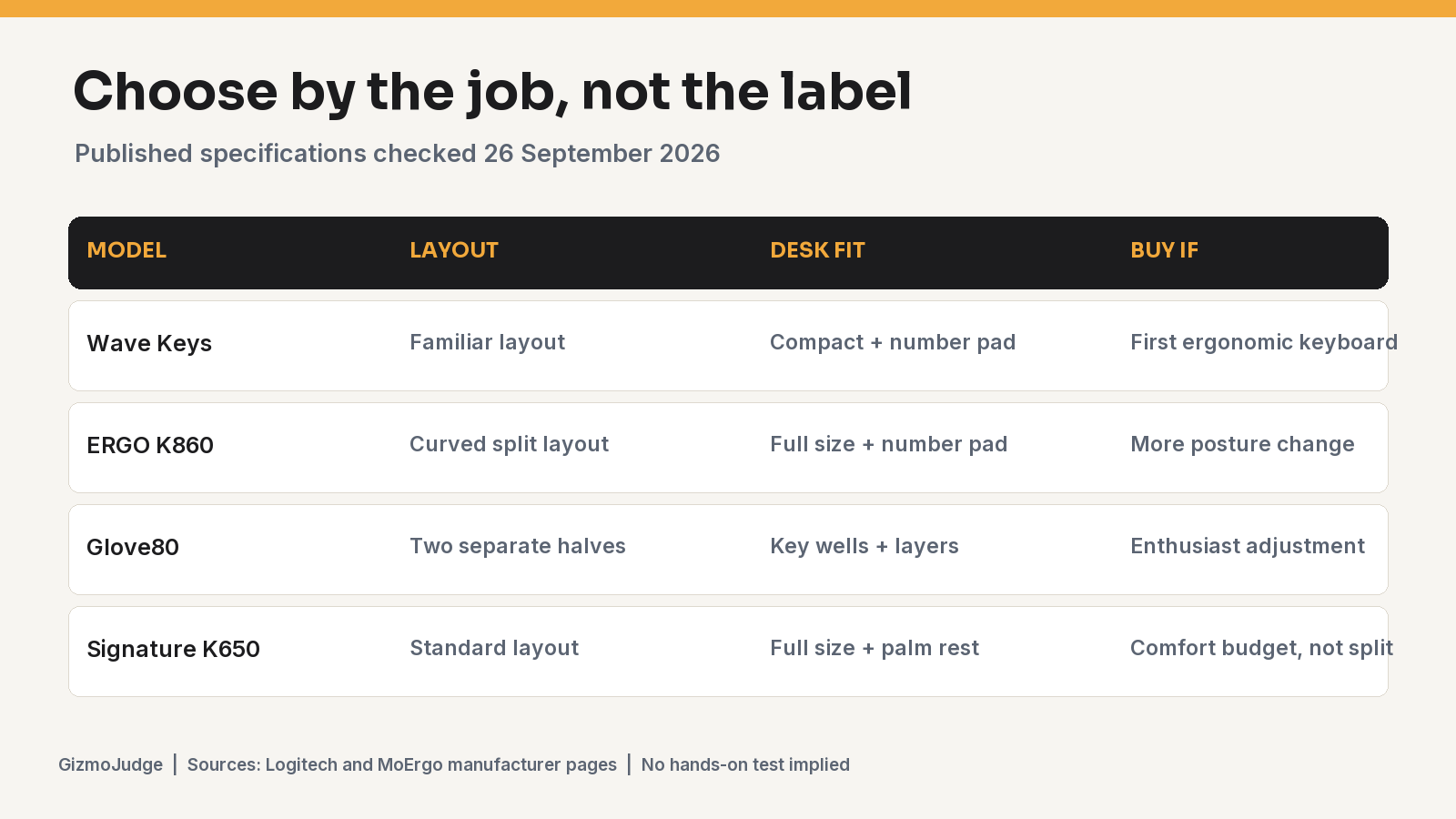
Pick by desk task and fit
| Need | Start here | Why | Check before buying |
|---|---|---|---|
| Familiar typing, compact desk | Wave Keys | Wave layout and integrated number pad in a narrower body | Its wave shape is not a split layout |
| Full-size split keyboard | ERGO K860 | Curved split keyframe, palm rest and three palm-lift positions | 17.95-inch width and a layout adjustment period |
| Small to medium mouse hand | Lift | Logitech explicitly sizes it for smaller hands; left-hand version exists | Try the 57-degree shape if possible |
| Medium to large mouse hand | MX Vertical | Logitech sizes it for larger hands and offers a 57-degree stance | Higher US list price and right-hand shape |
| Low-cost conventional keyboard | Signature K650 | Integrated palm rest and familiar full-size layout | No split, tenting or negative tilt claim |
Hand size is a starting filter, not a promise of comfort. Keyboard shape, desk height, typing habit and the ability to return a product matter more than a marketing label. If pain persists, a product list cannot diagnose it.
1. Logitech ERGO K860: buy if you want a real split layout
The manufacturer’s ERGO K860 page confirms a curved split keyframe, cushioned palm rest and palm-lift positions of 0, -4 and -7 degrees. It is a full-size board with a number pad. That combination makes it the strongest first recommendation here for someone who specifically wants to change wrist placement while keeping normal office keys. The cost is space and adaptation: it measures about 17.95 inches wide, and the split geometry changes where your fingers land. Logitech listed it at $149.99 in the US on 26 September 2026. Read our K860 spec-led review for the narrower buying decision.
2. Logitech Wave Keys: buy if you want a gentler first step
The Wave Keys product page describes a compact wave-shaped layout, cushioned palm rest, number pad, Bluetooth and Logi Bolt receiver. It keeps familiar key positions more closely than K860, so the decision is less about maximum adjustability and more about tolerable daily change. Logitech listed it at $69.99 in the US on 26 September 2026. It is the sensible keyboard to try when the desk is tight or a split layout feels like too much of a leap. It does not give you independently positionable halves.
3. Logitech Lift: buy for smaller hands
The Lift product page calls out small to medium hands, a 57-degree vertical stance and a left-hand model. That hand-size guidance is more useful than claiming a vertical mouse is universally ergonomic. Buy If you can return it after a week of real work: cursor tasks, grip preference and desk height can make the shape feel very different from a short shop trial. Logitech listed the right-hand model at $79.99 in the US on 26 September 2026. See our Lift review and Lift versus MX Vertical comparison.
4. Logitech MX Vertical: buy for a larger hand, if you need its fit
The MX Vertical product page describes a 57-degree stance and a fit for medium to large hands. It was $119.99 on Logitech’s US page on 26 September 2026. The key reason to pay more than Lift is fit, not a claim that the larger model is medically better. If your hand is small, Lift is the clearer starting point. The MX Vertical review covers its own tradeoffs.
5. Logitech Signature K650: buy for conventional comfort, not split ergonomics
Logitech’s Signature K650 page shows a full-size wireless layout, integrated palm rest and cushioned keys. It was $49.99 on sale from $59.99 in the US on 26 September 2026. This is a budget comfort choice for someone who wants a familiar keyboard, not a substitute for K860’s curved split keyframe or adjustable palm lift. The prior version of this guide called it an ergonomic pick too broadly; the narrower description is the defensible one.
What about the MoErgo Glove80?
The Glove80 specification confirms two independent halves and a concave key well, while the US product listing describes a revision-two model and travel case. That makes it an enthusiast option for people who want far more placement and layout control. The US listing displayed a stock notification when checked on 26 September 2026, so we do not count it among five immediately buyable picks or quote a price. Check live availability and return terms before treating it as a purchase option.
How we reached these verdicts
We matched manufacturer-published layout, dimensions, hand-size guidance, availability and direct US store prices to common home-office tasks. Manufacturer claims about reduced strain were not treated as independent proof of health outcomes. We did not conduct a hands-on test. Use the keyboard and mouse buying guide if you need to measure your setup before choosing.
Frequently asked questions
Is Signature K650 an ergonomic keyboard?
It has comfort features, including a palm rest, but it keeps a conventional full-size layout. If your goal is a split keyframe or negative palm tilt, choose a board that actually has those features.
Should I buy an ergonomic keyboard and mouse from the same brand?
No. Choose the keyboard for your typing position and desk width, then choose the mouse for hand size and pointer tasks. A shared receiver may be convenient but should not override fit.
Is a vertical mouse guaranteed to reduce pain?
No. A 57-degree shape changes forearm and wrist position, but comfort depends on the person and setup. Use a return window and seek qualified advice for persistent pain.